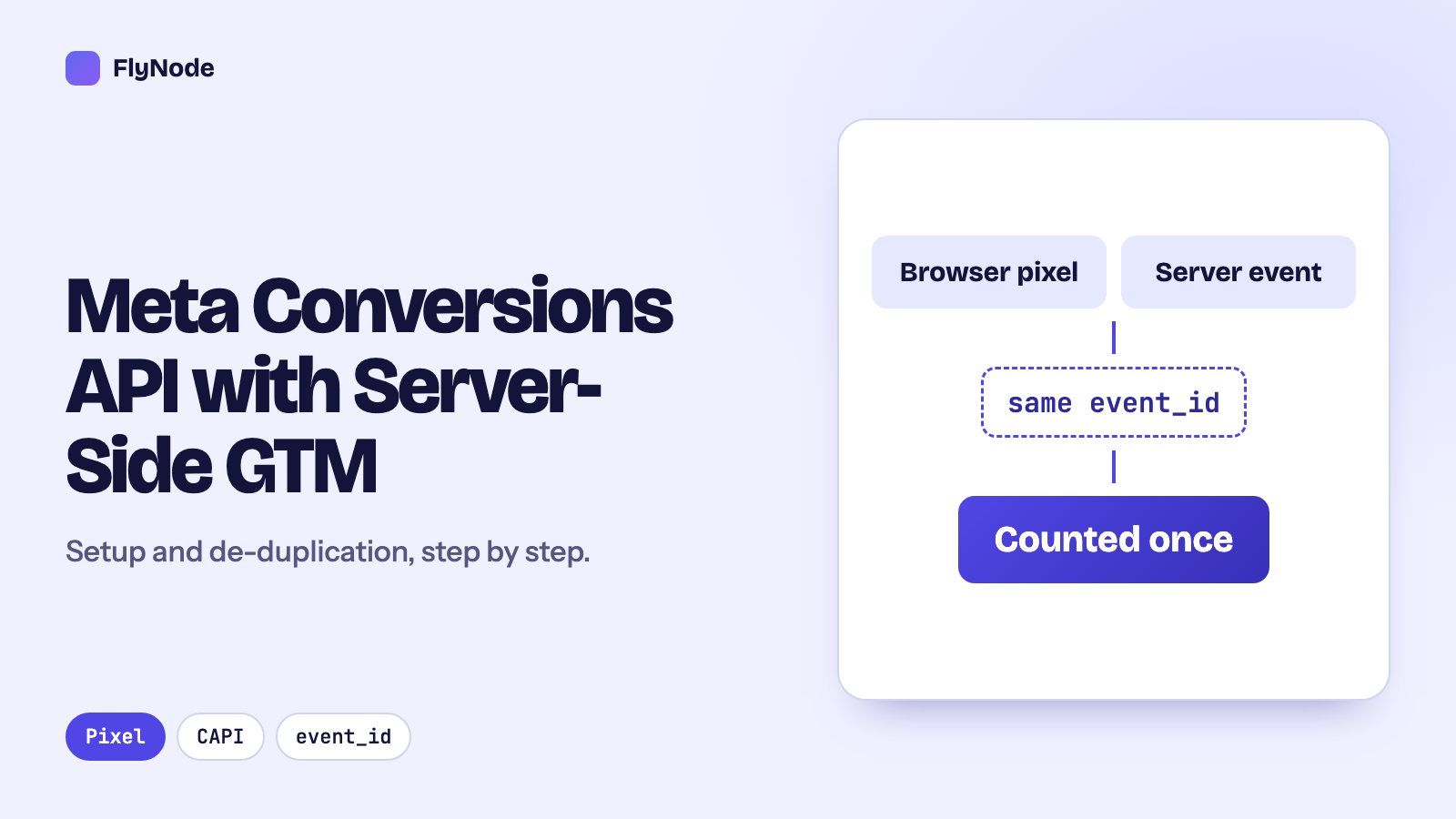
The short answer: Yes, keep the Meta pixel and add the Conversions API. Send each purchase from both, with the same event ID, and Meta keeps one. In our test on 4 November 2026 it marked the browser copy "Deduplicated". For cash on delivery, you can wait and send the Purchase from your server once the order is confirmed or delivered. Meta only accepts it within 7 days of the order. An event 7.1 days old was rejected with "Event timestamp too old". Meta accepted the value in taka (BDT) on the server side.
Most guides to the Conversions API are written for stores that take card payments and ship within a day or two. A lot of Bangladeshi stores work differently. Many orders are cash on delivery, some customers pay in the bKash app, and a good share of "orders" never turn into a sale. That changes which event you should send to Meta, and when.
We didn't want to repeat Meta's documentation, so we tested the parts that matter here. We used FlyNode's own Meta dataset in Test events mode: the pixel and the server sending the same purchase, a purchase sent through a FlyNode server container, and server purchases sent 2 to 8 days late. The results, and the exact errors, are below. For the general picture of how the pixel and the Conversions API work together, see our Conversions API setup guide. This article builds on it.
Why Bangladeshi stores lose purchase events
The pixel only reports a purchase if the thank-you page loads in the customer's browser and the pixel script runs there. Three things get in the way:
- Ad blockers and browser privacy settings stop the pixel script or its request to Facebook. Our article on ad blockers and tracking shows how to measure your own gap rather than trusting someone else's percentage.
- Customers who don't come back. If a customer pays in a payment page or app and then closes the tab before your thank-you page loads, the browser never sends the Purchase. Your server still knows the order was paid.
- Cash on delivery. Here the opposite happens. The thank-you page loads, the pixel fires a Purchase, and some of those orders are never accepted or never delivered. Meta then optimises your ads toward people who place orders they don't keep.
The Conversions API fixes the first two by letting your server report the sale. For the third, it lets you choose when to report it.
Test 1: the pixel and the server send the same purchase
We sent one Purchase of ৳1,500 from the browser pixel with the event ID dedup_match_3, then the same Purchase from the server through the Conversions API with the same event_id, 11 seconds later.
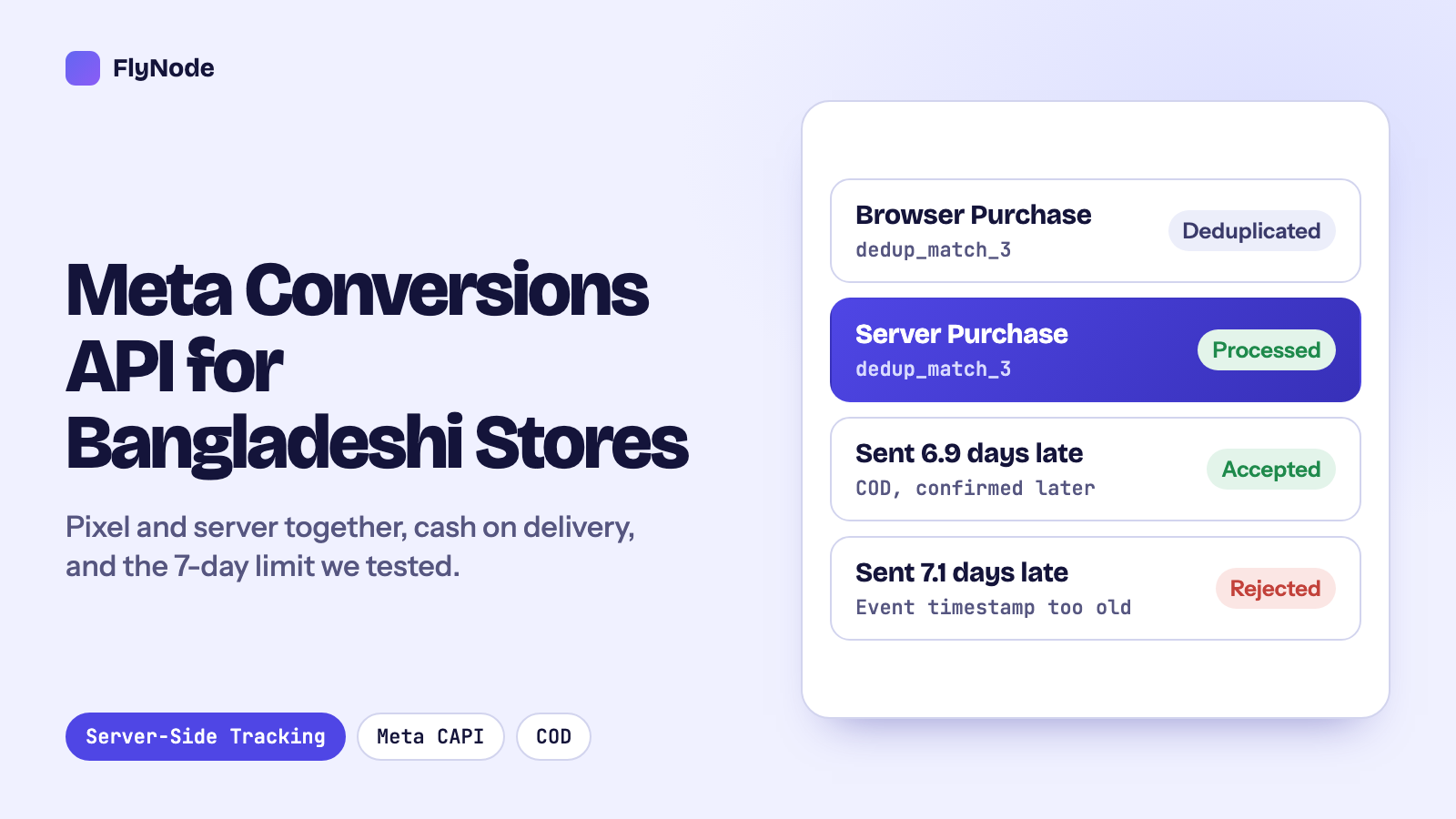
At first, Test events in Events Manager listed them as two separate rows: one from "Browser", one from "Server". When we looked again about 15 minutes later, Meta had grouped them. The server event stayed "Processed" and the browser event was marked "Deduplicated". So if you check straight after a test and see two purchases, wait before you decide the setup is broken.
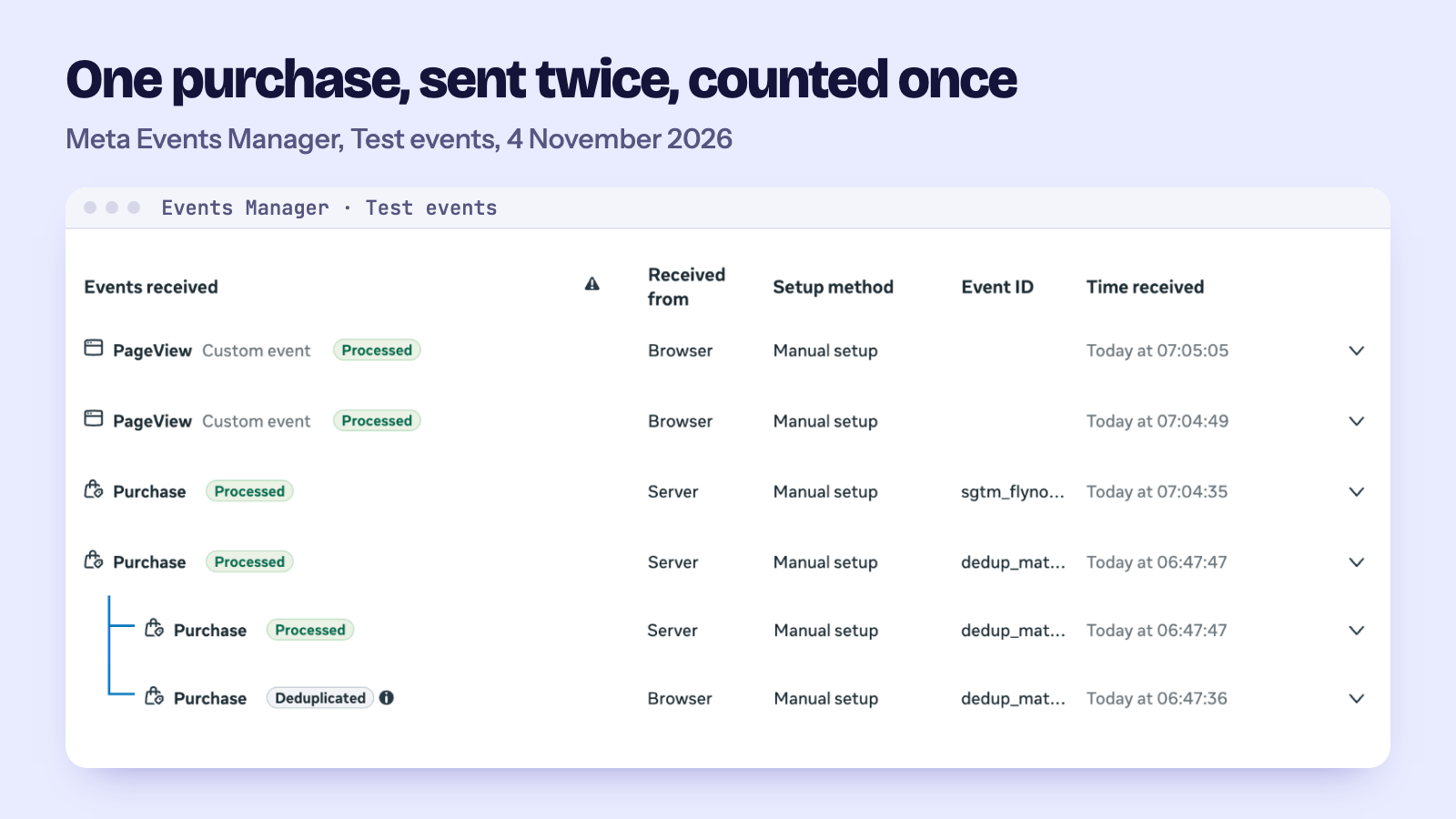
What makes this work is that both copies carry the same event name (Purchase) and the same ID. Meta's documentation says it only merges them if they arrive within 48 hours of each other. The simplest ID for a purchase is your order number. Create it once, give it to the pixel as eventID, and send the same value to the server. If the browser and the server each make up their own ID, nothing gets merged and every sale is counted twice.
Test 2: the same purchase through a FlyNode server container
Next we sent a purchase the way a real store would with server-side Google Tag Manager. The browser sends a GA4 event to the store's own tracking address, and the server container passes it on to Meta. We used FlyNode's own container with Meta's official Conversions API tag (the "facebookincubator" template), running in Tag Manager's Preview mode.
The purchase reached Meta as a server event (Graph API answered 200). In Test events it showed the value, the currency BDT, the order ID, and these customer details: Click ID, Browser ID, IP address and User agent. Click ID and Browser ID are the fbc and fbp values. The tag fills them in itself when "Extend Meta Pixel cookies (fbp/fbc)" is ticked. There was no email or phone, because our test event didn't carry any. If you have them and the customer's consent, send them hashed. They help Meta match the order to a person.
Two things we noticed on the way:
- The first attempt failed with a 400 error. The access token variable in the container still held the placeholder text from the setup, so Meta refused the request. Preview mode's Request tab showed the 400 straight away. That's the first place to look when the tag says "Failed".
- Preview mode shows the access token in plain text in the outgoing request address. Anyone who can open Preview for your container can copy it. Give Tag Manager access only to people you would also trust with the token.
The event ID gets there the same way. Add an event_id parameter to the GA4 event in your web container (the order number for purchases), use the same value as eventID on the pixel, and the Conversions API tag forwards it.
Cash on delivery: send the Purchase later, but within 7 days
With cash on delivery you have two honest choices:
- Purchase when the order is placed. This is simple and fast, and it's what most setups do. Meta learns quickly, but from orders that include fake and refused ones.
- Purchase when the order is confirmed or delivered. When the customer places the order, the browser sends a different event (for example
InitiateCheckout, or a custom "OrderPlaced"), notPurchase. Your server sends thePurchaselater, when your team confirms the order by phone or the courier marks it delivered. Meta then learns from real sales only.
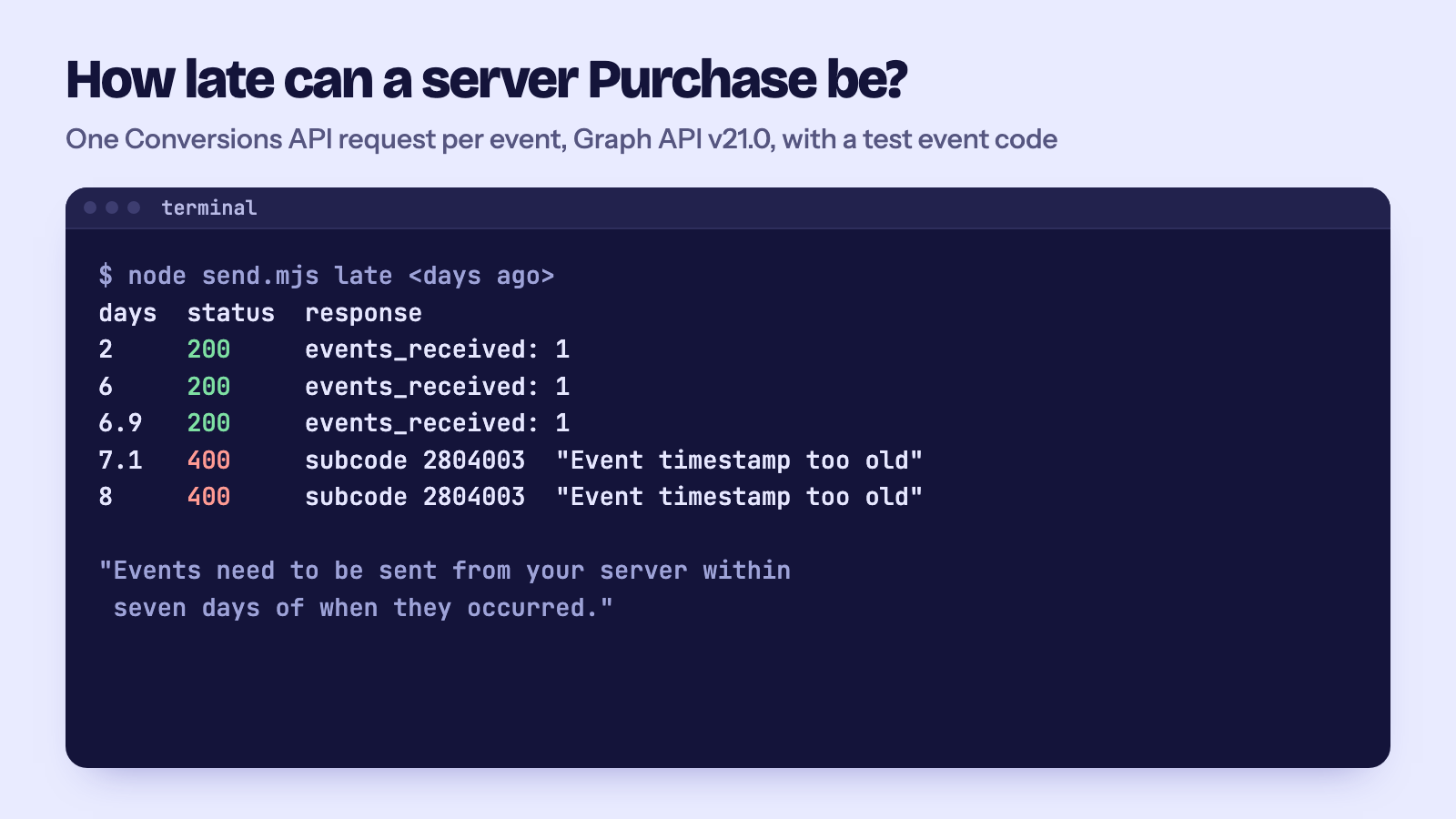
The second way only works if Meta accepts a Purchase that arrives days after the order. Meta's documentation states a 7-day limit for offline events. We tested whether website events follow the same rule, sending one server Purchase per request with event_time set in the past:
| Purchase sent this long after the order | Meta's answer |
|---|---|
| 0, 2, 6 and 6.9 days | Accepted (200, events_received: 1) |
| 7.1 and 8 days | Rejected (400, "Event timestamp too old": events must be sent within seven days of when they occurred) |
So the same 7-day limit applies to website events. For cash on delivery, that's usually enough if your delivery is quick. Orders that take longer than a week to deliver can't be reported as that day's purchase, so send the Purchase on confirmation instead of delivery, or accept that those sales are lost to Meta.
One more thing caught us out. When we sent a late event and a fresh one together in a single request, Meta answered 400 for the whole request, but Test events still showed the fresh event as received. A 400 doesn't mean nothing arrived. If your code retries the whole batch after an error, the good events go to Meta a second time. Keep the same event IDs on a retry, or simpler, skip orders older than 7 days before you send.
Sending the value in taka
We sent every test purchase with currency: "BDT" and a number for the value. On the server side Meta accepted it, and Test events showed currency BDT for both the server and the browser copy. Meta's list of supported currencies includes BDT.
The browser pixel did print a warning in the console: "Parameter 'currency' is invalid for event 'Purchase'", and it still sent the event. We don't know why the pixel's own check disagrees with what Events Manager accepted. If your ad account is billed in US dollars, look at how your purchase values appear in Ads Manager after a few real orders before you build value-based bidding on them. Whatever you choose, use the same currency in the pixel and the server event, and send the value as a plain number (1500, not "৳1,500").
Setting it up on FlyNode
- Deploy a container on FlyNode and connect Google Tag Manager. In the deploy wizard, choose Connect Google, then pick your Tag Manager account and server container, or let FlyNode create a new one. FlyNode builds the container config itself, so there is nothing to copy (how it works, and how to paste the config by hand if you can't connect the Google account). Our first container guide takes a few minutes. Free containers (15,000 requests a month, no card) run on our Dhaka server on BDIX. The Pro plan is ৳1,875 a month for 500,000 requests, and you can pay with bKash. All prices are on the Bangladesh page.
- Add your own tracking subdomain, for example
track.yourstore.com, so the requests are first-party: custom tracking domains. - Point your web container at it and add an
event_idto your purchase event: connect web GTM to your server container. - Add the Conversions API tag in the server container with your dataset ID and an access token from Events Manager. Put a Test event code in the tag while you test, and remove it before you publish.
- Test in Preview mode with Test events open, place a test order, and give Meta a little time before you look for the "Deduplicated" label.
When it isn't worth it
If you spend very little on Meta ads, or almost all your orders come through Messenger and phone calls rather than your website, the Conversions API won't change much. The pixel alone is fine to start with. The same goes if nobody on your side can look after a tag setup: a half-working setup that double counts is worse than a pixel on its own. It starts to pay off once your website gets steady orders from ads and you want Meta to learn from real sales, not from every click on "Confirm order".
Questions
Do I still need the pixel if I use the Conversions API?
Meta recommends both. The pixel sees things only the browser knows, and the server covers what the browser misses. Use the same event ID in both and Meta keeps one copy.
Why do I see two purchases in Test events?
Either the IDs don't match, or Meta hasn't merged them yet. In our test the "Deduplicated" label was there when we checked about 15 minutes after both events arrived. Check that the event name and the event ID are exactly the same in both.
Can I send a Purchase when the courier delivers the order?
Yes, if it happens within 7 days of the order. Set event_time to when the order was placed or delivered, and send it before day 7. In our test, 6.9 days was accepted and 7.1 days was rejected.
Should I send the value in taka or in dollars?
Meta accepted BDT in our server test. Pick one currency, use it in both the pixel and the server event, and check how the values show in Ads Manager for your ad account before you rely on them for bidding.
Does server-side tracking get around a customer's consent choice?
No. The server only knows what you send it. Pass the consent state with your events and let your tags respect it. Our guide to server-side tracking and privacy covers this.
How we tested
All tests ran on 4 November 2026 against FlyNode's own Meta dataset, with a Test event code, using Graph API v21.0 for the direct server calls. The server-container test used FlyNode's server container in Tag Manager Preview mode, with Meta's Conversions API tag template (which calls Graph API v16.0). Customer details in the direct calls were a hashed test email and phone number and a documentation IP address. Prices are from flynode.io on the same day.
Sources
- Meta, Handling duplicate pixel and Conversions API events (read November 2026)
- Meta, Sending offline events using the Conversions API (7-day limit for offline events; read November 2026)
- Meta, Currency codes (read November 2026)
- FlyNode, Server-side tracking in Bangladesh
Get new articles in your inbox
New guides on WordPress, tracking and automation, once or twice a month. No spam, unsubscribe any time.